HTTP Security Settings Menu Options
From the OVOC Server Manager root menu, choose HTTP Security Settings.
HTTP Security Settings
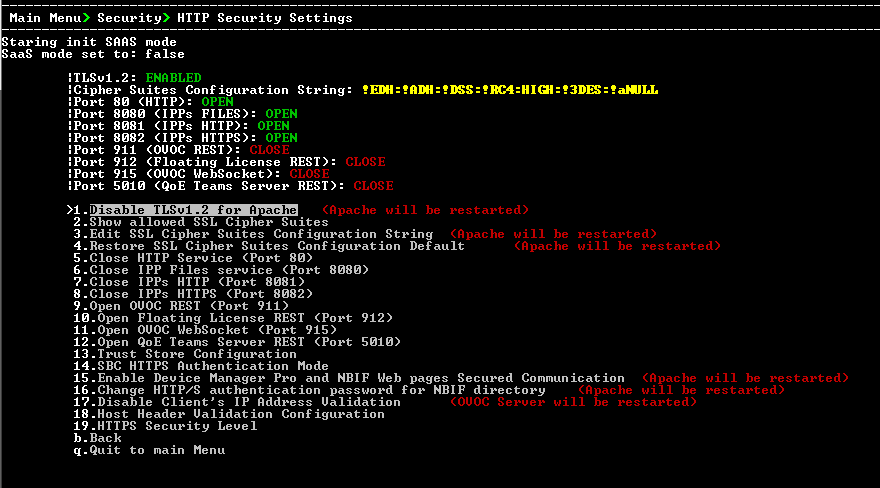
This menu allows you to configure the following Apache server security settings:
| ■ | Disable TLSv1.2 (TLSv1.2 for Apache) |
Default: TLSv1.3
| ■ | Show Allowed SSL Cipher Suites |
| ■ | Edit SSL Cipher Suites Configuration String |
| ■ | Restore SSL Cipher Suites Configuration Default |
| ■ | Manage HTTP Service Port (80) |
| ■ | Manage IPP Files Service Port (8080) |
| ■ | Manage IPPs HTTP Port (8081) |
| ■ | Manage IPPs HTTPS Port (8082) |
| ■ | OVOC Rest (Port 911) |
| ■ | (Floating License (Port 912) |
| ■ | OVOC WebSocket (Port 915) |
| ■ | QoE Teams Server REST (Port 5010) |
| ■ | (Trust Store Configuration) |
| ■ | (SBC HTTPS Authentication Mode) |
| ■ | (Enable Device Manager Pro and NBIF Web Pages Secured Communication) |
| ■ | (Change HTTP/S Authentication Password for NBIF Directory) |
| ■ | (Disable Client's IP Address Validation) |
| ■ | (Host Header Validation Configuration) |